This story turns a decorating idea into a practical approach for real homes instead of simply presenting a look.
Define working time and equipment first
Paying bills for one hour a week and using the computer for eight hours every day do not require the same desk solution. List the need for a laptop, separate monitor, drawing equipment, documents, and video calls. Table depth and chair quality should increase according to the duration of use.
In infrequent use, a closing table may make sense; Disassembling the system every evening is unsustainable while working full time. It looks more professional to create a calm, permanent and well-wired spot within the salon rather than trying to hide the true order of business. If the employer has ergonomics or data security rules, include them in the plan.
Position the table in appropriate light, not in the transition area
Placing a table in front of the balcony door because it is bright may narrow the main route. Positioning sideways to the window can reduce direct glare on the screen when using daylight. Do not just look at the morning photo as the direction of the light changes during the day; Try the screen temporarily in the same spot at different times.
A bright sky right in front of the window can cause eye fatigue, and a bright sky in the back can cause reflection on the screen. Consider curtain or canopy support. The table radiator should not cover the window handle or the vent; Door opening and balcony passage must remain open in all cases.
“A good work corner doesn't fit the desk into the empty wall; It solves the body, screen, cable and the rest of the house in the same plan.”
Determine desk depth by screen and arm distance
A slim console table looks small, but if the screen comes too close and there is no wrist support, it is not suitable for long work. Measure the screen size, stand depth, keyboard and forearm support together. The monitor arm can add surface, but the desk top must support the mount.
If using a wall-mounted desk or rack desk, verify total load, wall type and connection with a qualified installer. The thin table may stretch over time. Leave a clear height and width where the knees do not hit; Do not squeeze the drawer unit directly under the seating area.
Do not consider the chair withdrawal allowance as an invisible area
Even if the table fits the wall, it may spill into the main passage of the living room when the chair is in use. Mark with tape the space you need to sit and stand, lean back, and allow someone to pass behind you. If the chair is constantly in the middle of the road, the table location or size should be reconsidered.
For short-term work, a compact chair may be sufficient; Waist, seat and adjustment support becomes important during long use. Dining chairs are not ergonomic for all sizes and durations. Try to see if the armrests fit under the table, the safe movement of the wheel on the floor.
Make the cable a design layer, not a temporary splice
The cable running diagonally from the socket to the table looks messy and creates a tripping risk. Plan power needs, adapters and internet connection along with desk location. Cable duct, under-table tray and labeled adapters can lift the system off the floor.
Do not hide the extension cord under carpeting, do not overload it, and do not trap heat-generating adapters in a closed box. If a new outlet or landline is required, use a qualified electrician. The system, which closes securely with a single key when the work is completed, also calms the evening appearance of the living room.
Balance video calling and audio with the rest of the house
It is not necessary to fill the room with decor for the behind-the-scenes image; A clean wall, curtain or tidy shelf is sufficient. The screen height should not show the face from below, the main window should give soft light from the side. A small portable lamp can be helpful during dark hours.
Echo may increase in a hard-surfaced hall; Carpets, curtains and fabric surfaces soften the sound. However, before purchasing an acoustic panel, test the microphone position and door closing. Plan shared home meeting times, headphone use, and visual privacy as clearly as physical order.
Reclaim the living room with an end-of-work ritual
Even at the permanent desk, a closed drawer or box for documents, headphones, and laptop makes it feel like the workday is over. Instead of trying to hide everything in the closet, leave only the next day's essential equipment on the surface. Being able to push the chair fully under the table immediately improves circulation.
Rehearse a working day from start to finish: come to the table with coffee, make a call, recharge and move on to the lounge in the evening. If the lights, cables, chairs and storage do not block any other function at any stage, the corner really fits into the house.
Related guides: living room lighting
Readjust ergonomics at regular intervals
While the desk and chair may be correct on day one, the screen, equipment or operating time may vary. If shoulder, wrist and neck discomfort recurs, instead of just changing the decor, seek occupational health recommendations and, when necessary, expert evaluation.
Check chair adjustment, monitor height, loose connections, and cable damage quarterly. Remember that daylight changes with the season; If the screen orientation that works well in summer creates glare in winter, rearrange the screen and table angle.
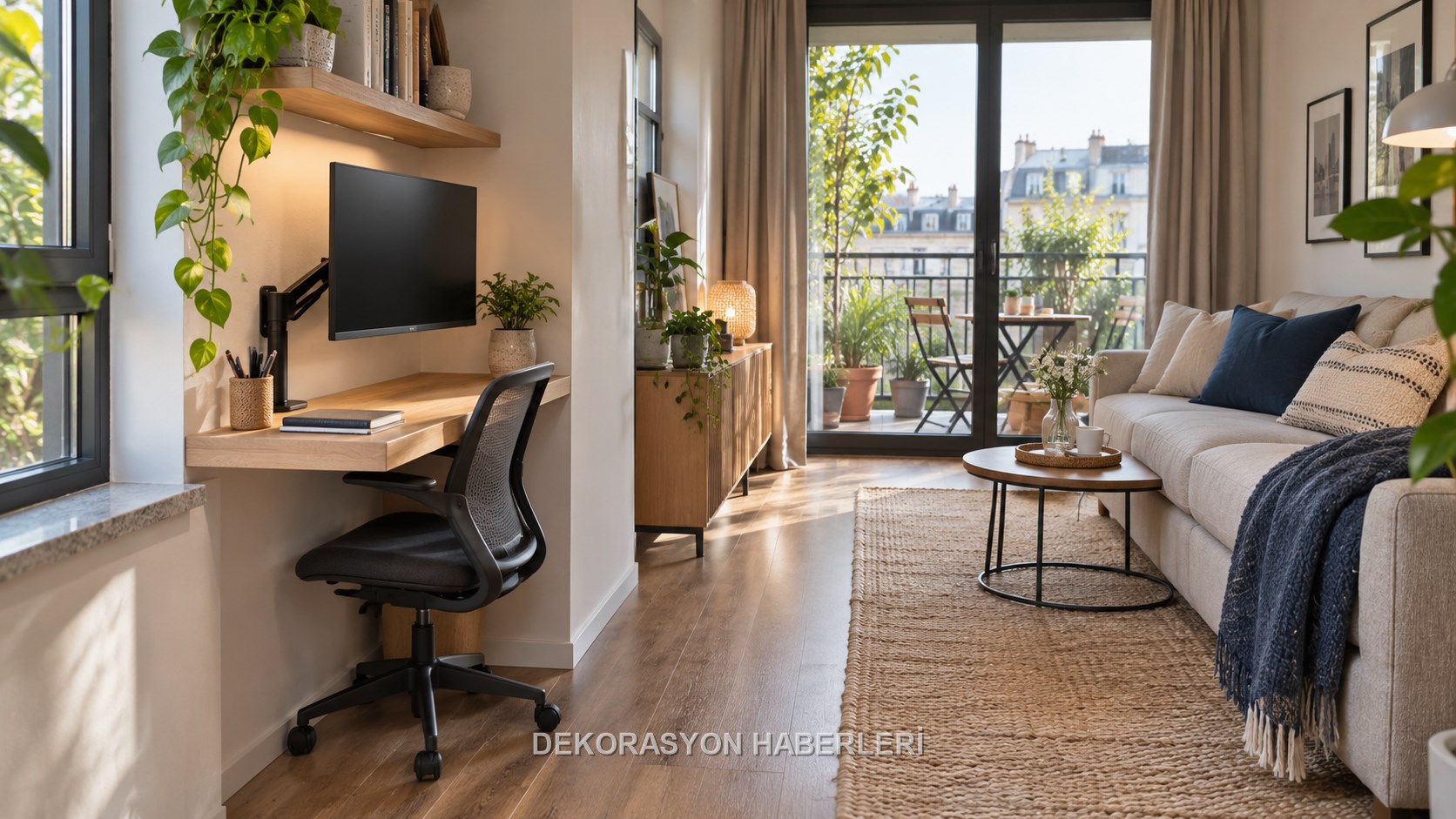
A realistic home-office plan that solves the need for desk depth, screen, chair, daylight, cable and acoustics together with the circulation of the living room.
Decision table
Application checklist
- ✓Define working time and equipment first
- ✓Position the table in appropriate light, not in the transition area
- ✓Determine desk depth by screen and arm distance
- ✓Do not consider the chair withdrawal allowance as an invisible area
- ✓Make the cable a design layer, not a temporary splice
Most common mistake
Even at the permanent desk, a closed drawer or box for documents, headphones, and laptop makes it feel like the workday is over. Instead of trying to hide everything in the closet, leave only the next day's essential equipment on the surface. Being able to push the chair fully under the table immediately improves circulation. Rehearse a working day from…
Care note
While the desk and chair may be correct on day one, the screen, equipment or operating time may vary. If shoulder, wrist and neck discomfort recurs, instead of just changing the decor, seek occupational health recommendations and, when necessary, expert evaluation. Check chair adjustment, monitor height, loose connections, and cable damage quarterly.…
Frequently asked questions
What should be decided first for A work corner in a narrow home without disrupting the living room?+
Paying bills for one hour a week and using the computer for eight hours every day do not require the same desk solution. List the need for a laptop, separate monitor, drawing equipment, documents, and video calls. Table depth and chair quality should increase according to the duration of use. In infrequent use, a…
What should be checked before measuring and installation?+
Placing a table in front of the balcony door because it is bright may narrow the main route. Positioning sideways to the window can reduce direct glare on the screen when using daylight. Do not just look at the morning photo as the direction of the light changes during the day; Try the screen temporarily in the same…
Which criteria matter when choosing materials?+
A slim console table looks small, but if the screen comes too close and there is no wrist support, it is not suitable for long work. Measure the screen size, stand depth, keyboard and forearm support together. The monitor arm can add surface, but the desk top must support the mount. If using a wall-mounted desk or…
How should the maintenance plan be organised?+
While the desk and chair may be correct on day one, the screen, equipment or operating time may vary. If shoulder, wrist and neck discomfort recurs, instead of just changing the decor, seek occupational health recommendations and, when necessary, expert evaluation. Check chair adjustment, monitor height, loose…